One ISP across the FPGA bridge and the GPU. Tuned once.
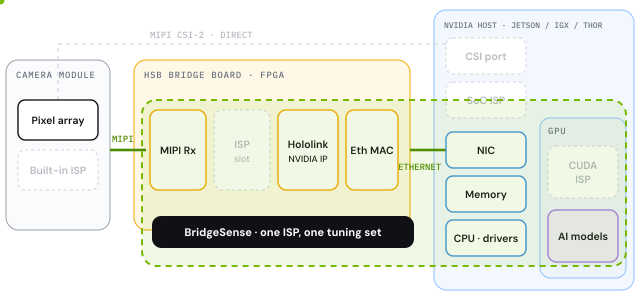
BridgeSense brings up any Holoscan Sensor Bridge camera and runs one open-source ISP across the FPGA and the NVIDIA GPU, with a single tuning set on both sides. The GPU stays free for AI.
Three steps, from a new camera to clean video for your AI.
Step 1 · You
Plug in a camera
Camera
→
Bridge board
→
NVIDIA
Any Holoscan Sensor Bridge setup: a camera on a Lattice, Microchip or Altera bridge board, linked to Jetson, IGX or Thor over Ethernet.
Step 2 · BridgeSense
Sets it up for you
Recognises the board and the sensor
Loads the image processing (ISP)
Applies the tuning, adjustable live
No drivers to write, no FPGA tools, no hand-tuning per board.
Step 3 · Your AI
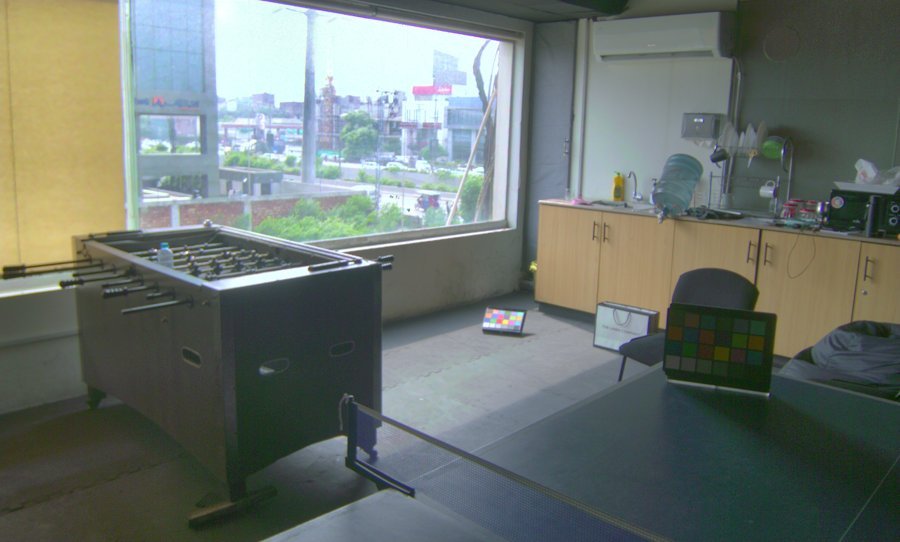
Gets clean, tuned video
NVIDIA GPU time
your AI models imaging
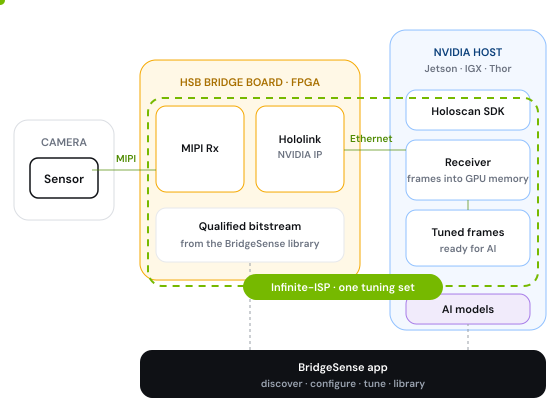
Frames arrive in GPU memory ready for your models, and most of the GPU stays free for AI.
tuning set for FPGA and GPU stages
0
open-source ISP core
0%
FPGA vendors: Lattice, Microchip, Altera
0
changes to NVIDIA’s Hololink IP
0
01 · The problem
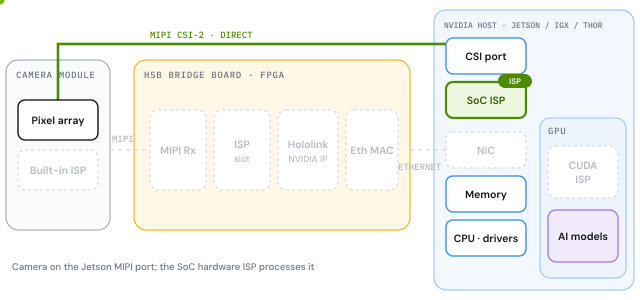
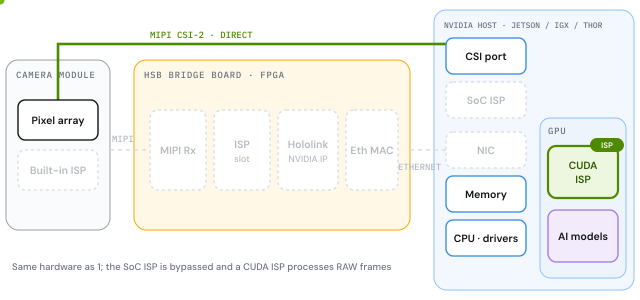
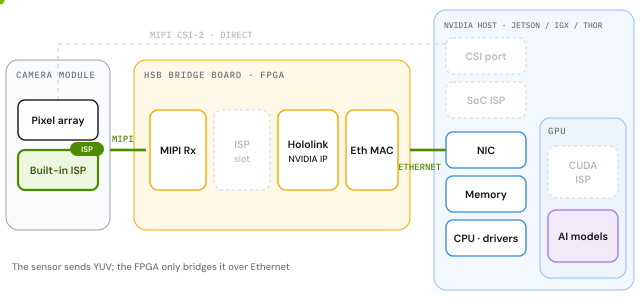
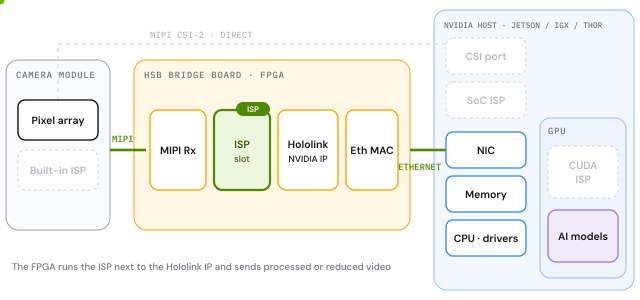
Four ways a camera reaches NVIDIA today. Each locks the ISP somewhere.
In the SoC, in the sensor, in the FPGA or on the GPU. Pick a path to see where the ISP runs, what it costs you, and how BridgeSense changes it.
Sensor direct to Jetson, ISP in the SoC
ISP runs in the NVIDIA SoC
Pros
No extra chips; lowest bill of materials
Hardware ISP: no GPU time spent on imaging
Mature stack (Argus / V4L2), low latency
Cons
A V4L2 driver and device tree for every new sensor
ISP is closed: tuning goes through partners
Short MIPI reach; cameras limited by CSI lanes
BridgeSense: open, tunable ISP and any sensor via auto-detect and the sensor agent, with cameras over Ethernet.
Sensor direct to Jetson, ISP on the GPU
ISP runs on the GPU (CUDA)
Pros
Fully software: tune or change algorithms any time
Any algorithm the GPU can run: NR, HDR, AI-tuned
No extra hardware
Cons
ISP time comes out of the GPU’s AI budget
Still a V4L2 driver per sensor; short MIPI reach
RAW at full rate reaches the host
BridgeSense: keeps this tunability and keeps more of the GPU for AI.
HSB with the sensor’s built-in ISP
A basic ISP inside the sensor chip
Pros
Simplest system: no ISP to build or host
Processed video: the GPU stays free for AI
Long reach and many cameras over Ethernet
Cons
Basic image quality: simple AE/AWB, little NR
Barely tunable; locked to one sensor vendor
YUV costs more link than RAW
BridgeSense: a full, tunable pipeline on the same bridge, and the same bring-up for these sensors too.
HSB with the ISP in the FPGA
ISP runs in the FPGA fabric, before Hololink
Pros
No extra chip; processing right at the sensor
Cuts link load: merge or compand before Ethernet
Deterministic latency; GPU stays free for AI
Cons
Fabric limits what fits; full pipelines don’t
Vendor FPGA ISPs are closed and fixed
Every change is a rebuild and a reflash
BridgeSense: the same bridge, with a full ISP that stays tunable and upgradable from the app.
One ISP across the FPGA and the GPU
One open ISP · one tuning set · one app
Pros
One tuning set for the whole pipeline
Board and sensor auto-detection; sensor agent for new sensors
Upgrades from the app, no vendor FPGA tools
Keeps more of the GPU for AI
Cons
Needs a Holoscan Sensor Bridge board
New boards need a one-time bring-up and qualification
Open core: Infinite-ISP and the app are open; Hololink stays unmodified.
SoC ISP
GPU ISP
Sensor ISP + HSB
FPGA ISP + HSB
BridgeSense
Tuning
Through partners
Full, in software
Vendor presets
If registers exposed
One set, both sides
New sensor
Driver + partner tuning
Driver, then tune
Register tables
RTL + bitstream
Auto-detect + sensor agent
Upgrade a module
Not possible
Software update
Not possible
Rebuild + reflash
Update from the app
Image quality
Partner-tuned
High, tunable
Basic
Fabric-limited
Full pipeline
GPU kept for AI
Yes
ISP takes GPU time
Yes
Yes
More GPU left for AI
02 · How it works
One app on the host. Three jobs.
BridgeSense runs on the Holoscan SDK and processes no pixels itself. It discovers the board and sensor, configures them, starts the stream, and applies one tuning set to the whole pipeline.
Bring-up
Detects the board, Hololink version and sensor. Picks a qualified bitstream from the library and flashes it from the app, with no vendor FPGA tools on day one.
Unified imaging
One open-source ISP, Infinite-ISP, with one set of parameters and one image-quality reference, whichever bridge you use.
Library
Qualified board × sensor × bitstream combinations with real resource numbers, test results and licences, across Lattice, Microchip and Altera bridges.
The bridge board announces itself; the sensor answers over I2C. BridgeSense reads both, picks the matching bitstream and sensor configuration from its library, and starts streaming. No vendor IDE, no hand-written driver.
Known sensor
Identified by its chip ID. Mode tables, register sequences and a base tuning file come straight from the library.
Unknown sensor
The Sensor Configuration Agent reads the datasheet and generates the driver, mode tables and register sequences, then validates them on the bridge. The result joins the library.
Board auto-detection: vendor, board, Hololink version, bitstream in flash
Sensor auto-detection over I2C through the bridge; mode stays your choice
Qualified bitstreams flashed from the app, with a licence check and a safe fallback image
BRIDGESENSE · BRING-UP
$ bridgesense bring-up
listening for boards …
✓ board found Lattice CertusPro-NX VersaHololink 0x2606 · 1 GbE · bitstream in flash
probing sensor over I2C …
✓ sensor found Sony IMX214id 0x0214 @ 0x10
library lookup Versa × IMX214
✓ bitstream passthrough v2606matches flash · no reflash needed
✓ validated on bridge IMX678 · 1936×1166 · RAW10added to library
auto-detect · library · sensor agent
BRIDGESENSE · TUNING · LIVE
Colour correction LIVE
IMX214 · LATTICE HSB · ORIN NX · LIVE
Streaming · changes apply on the next frame
04 · Tuning
Tune once. Live, on every board.
Every ISP module is tunable while the camera streams, from one screen, with one tuning file that travels with the sensor to every bridge.
One set of parameter names and ranges for the whole pipeline; the app applies them for you
Live image, 3A statistics and image-quality metrics while you tune
A/B snapshots and presets per sensor mode
05 · Where it fits
Built for cameras that can’t sit next to the GPU.
Holoscan Sensor Bridge puts the camera metres away over Ethernet. BridgeSense makes those cameras plug-and-play, tuned, and light on the GPU.
1GbE
Single camera, long reach
Industrial inspection, lab and medical imaging. A tuned 1080p camera over 1 GbE, metres from the host.
Jetson Orin · IGX
HDR
High dynamic range at the edge
HDR sensors with one tuning set, for surgical and outdoor scenes.
Any HSB bridge · planned
10GbE
Multi-camera on 10 GbE
Robotics and mobility: several sensors on one bridge, one tuning set across all of them.
AGX Orin · Thor · 10 / 25 GbE
06 · Open source
Open core. Bitstreams delivered the way NVIDIA does it.
The ISP, the app and the build recipes are open. Finished bitstreams are hosted with a manifest and checksum and a licence step in the app, the same model NVIDIA uses for Holoscan Sensor Bridge firmware. Hololink stays unmodified, so every bitstream stays HSB-compatible.
Same chip is not the same board. For your own board we share the recipe and you build with your licence, or we build and qualify it for you.
Jetson Orin and IGX today; multi-camera and 4K need a 10 or 25 GbE host such as AGX Orin or Thor with a ConnectX NIC. The host is part of pilot scoping.